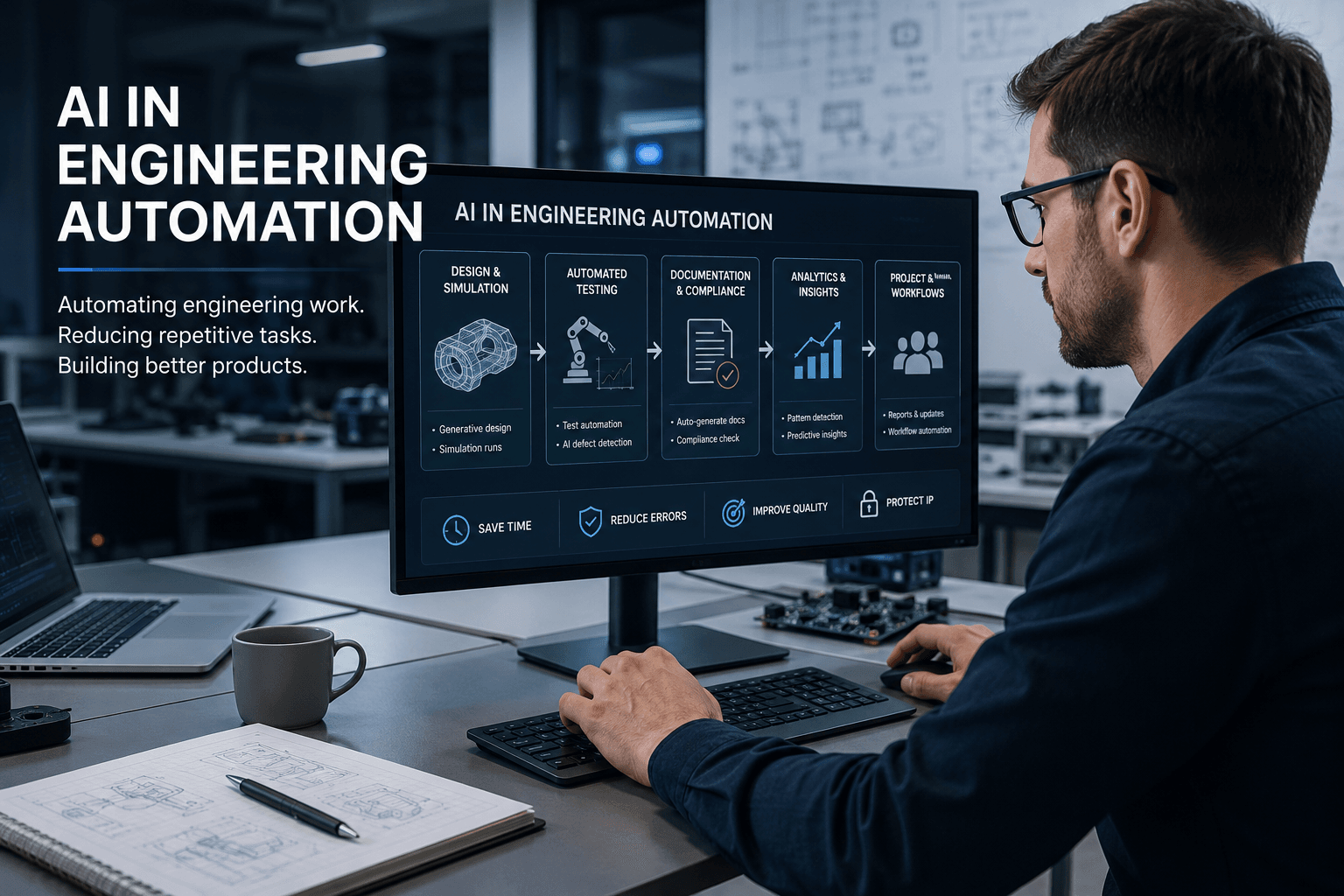
AI in engineering automation is the use of machine learning and AI tools to take over the repetitive parts of engineering work: testing, documentation, simulation runs, compliance paperwork and the admin that sits around every project. Most articles on the topic are written by software vendors. We’re an electronics design firm in Sydney, so our view is a bit different. We care about what actually saves time on a real product development job, what it costs, and how to use these tools without handing client IP to a public cloud service. This guide covers all three.
What AI in engineering automation actually means
The phrase gets used loosely, so it helps to separate three layers.
Design automation is AI inside the engineering tools themselves: auto-routing in PCB software, generative design in CAD, code assistants for firmware. We’ve written separately about AI in electronics design and AI in embedded software development, so this article won’t repeat that ground.
Process automation is AI applied to the workflow around the design: running and checking tests, generating documentation, chasing compliance requirements, comparing supplier quotes.
Operations automation is AI applied to the business itself: project coordination, reporting, scheduling, and the internal admin that every engineering firm carries.
The first layer gets almost all the attention. In our experience the second and third are where small and mid-sized firms lose the most hours, and they’re also the cheapest places to start with engineering automation because you don’t need to change your design tools at all.
Where AI is automating engineering work today
Here are the areas where AI automation is doing genuinely useful work right now, roughly in order of how mature the tools are.
Generative design and simulation
Give the software your constraints, such as weight, strength, cost and manufacturing method, and it proposes candidate designs or runs thousands of simulation variations overnight. This is well established in mechanical CAD and getting better in electronics. The catch is that the output still needs an engineer who can tell a clever result from a nonsensical one. The tools explore the option space faster than a person can; they don’t yet know which options are sensible.
Automated testing and quality control
This is the area we know best. Hardware testing has always used automation, and automated test jigs are standard practice on any production run. What AI adds is the layer above the jig: spotting patterns across test logs, flagging units that pass but sit near the edge of tolerance, and catching visual defects with camera-based inspection that would bore a human inspector into missing them. On the software side, AI tools now write and maintain a good share of routine test code.
Documentation, compliance and reporting
Probably the least glamorous application and, for many firms, the best return. Engineering runs on documents: test reports, design histories, user manuals, regulatory submissions. AI is good at first drafts of all of these, and good at checking a pile of documents against a checklist of requirements. It doesn’t remove the engineer’s review, but turning a blank page into a reviewable draft is a real saving. On regulated products, where the paperwork can rival the design effort, this matters a lot.
Predictive maintenance
For firms that build or operate industrial equipment, machine learning models watch sensor data and flag failures before they happen. This is one of the oldest and most proven uses of AI in engineering, and the tooling is mature. The hard part is rarely the model. It’s getting clean sensor data in the first place.
Project coordination and admin workflows
The least technical layer and the easiest to pilot. Meeting notes, status reports, quote comparisons, chasing sign-offs, keeping the project tracker honest. None of this is engineering, but engineers end up doing it. AI workflow tools now handle a decent share of it, and because nothing here touches your design files, it’s a low-risk place to build confidence with automation.
What this looks like on real product development jobs
The pattern we keep seeing across projects is that AI helps most at the edges of the work, not the centre.
The centre of a product development job is judgement: choosing an architecture, weighing cost against performance, deciding when a prototype is ready for a client. No tool we’ve used comes close to automating that, and we’re sceptical of anyone selling one that claims to.
The edges are different. Every project carries a tail of repetitive work. Test procedures that mostly resemble the last project’s test procedures. Reports that restate what the logs already say. Board bring-up checklists. Firmware boilerplate. This is where AI tools have quietly become part of how we work, the same way version control and simulation did before them. [Optional: insert a short specific example from a recent Zeus project here, e.g. one sentence on time saved drafting test documentation.]
One lesson worth passing on: the gains compound only if someone owns the process. A tool that drafts test reports saves nothing if every engineer uses it differently and nobody trusts the output. The firms getting real value from engineering automation treat it like any other process change, with an owner, a standard way of working and a review step. The ones treating it as a personal productivity hack get inconsistent results and, eventually, a quality scare that sours the whole team on it.
The data security question: AI without giving away your IP
Here’s the question that comes up before any other when engineering firms talk about AI, and the one most articles skip: what happens to your data?
Paste a schematic note, a client requirement or a chunk of firmware into a public AI chatbot and that data has left your building. Depending on the tool and the plan you’re on, it may be stored, logged or used for training. For a firm handling client IP under NDA, or working on defence, medical or security products, that’s not a grey area. It’s a breach waiting to be discovered.
Broadly, you have three options, in increasing order of control.
Public cloud tools with enterprise controls. The business tiers of the big AI platforms offer no-training guarantees and data retention controls. Fine for low-sensitivity work, provided someone actually reads the terms and configures the workspace properly rather than letting staff use personal accounts.
Hybrid setups. Sensitive steps run on infrastructure you control, while generic tasks such as drafting a manual from already-public specs can use cloud models. This is a practical middle ground for most product firms.
Private AI. The models run on your own hardware or in a dedicated environment, and sensitive data never leaves your control. This used to be impractical for smaller firms, but capable open models have changed that. Specialist providers such as Glivent, who build private AI systems that process data onsite, now set this up for businesses that can’t send client information to public cloud services. For engineering firms whose whole value sits in IP they don’t own, this is often the only arrangement a client’s NDA actually permits.
Whichever route you take, write it down. An AI usage policy of one page, saying which tools are approved for which classes of data, prevents the scenario where a well-meaning engineer solves a problem quickly and creates a contractual one slowly.
What does AI engineering automation cost?
Ballpark figures, in Australian dollars, as of mid-2026. Treat these as orientation rather than quotes, because pricing in this market shifts quickly.
| Level | What it covers | Typical cost |
| Off-the-shelf tools | AI features in your existing CAD, EDA or project software, plus general AI assistants on business plans | $30 to $150 per user per month |
| Pilot automation project | One workflow automated properly, e.g. test reporting or document checking, including setup and training | $10,000 to $40,000 |
| Custom or private AI system | Dedicated infrastructure, private models, integration with your systems | $50,000 upwards, plus running costs |
The honest cost comparison isn’t tool versus no tool. It’s tool versus the engineer hours currently going into the work. A senior engineer’s time runs at $150 to $250 an hour once you count overheads. If a $40,000 pilot removes five hours a week of report drafting across a team, it pays for itself within the year. If it automates something nobody was actually spending time on, it never pays for itself at all, which is why the audit step below matters more than the technology choice.
How to start: a roadmap for engineering firms
The firms that do well at this start small and measure. The ones that struggle buy a platform first and look for problems it might solve afterwards. A sequence that works:
- Audit the repetitive work. For two weeks, have the team note tasks that feel like they’ve done them before. Testing, reporting, quoting and documentation will dominate the list. Rank by hours consumed.
- Pick one low-risk pilot. Choose a workflow that eats real hours but can’t damage a client relationship if the tool gets it wrong. Internal documentation and test reporting are good first candidates. Client-facing deliverables are not.
- Set a baseline before you start. Measure how long the task takes today. Without this number, you’ll be arguing from impressions in three months.
- Run it for 90 days with an owner. One person accountable for the process, a standard way of using the tool, and a human review step on everything that leaves the building.
- Expand or kill it. Compare against the baseline. If it saved real hours, extend it to the next workflow on the list. If it didn’t, stop. A failed pilot that cost a few thousand dollars is cheap information.
And a short list of what not to automate: anything safety-critical without full engineering review, final design sign-off, and client communication on contested topics. The technology will tempt you. Resist it in those three places.
Frequently asked questions
Will AI replace engineers?
Not on current evidence. AI in engineering automation removes repetitive tasks, not engineering judgement. Demand is shifting toward engineers who can direct these tools well and away from roles that were mostly routine documentation and testing. The firms we see adopting AI are redeploying engineers onto design work, not reducing headcount.
What engineering tasks can be automated with AI?
Today, the strongest candidates are test execution and analysis, first drafts of documentation and reports, compliance checking against requirements, simulation sweeps, visual quality inspection and routine project admin. Core design decisions, architecture trade-offs and final sign-off still need an engineer and should keep one.
Is AI safe for confidential engineering data?
Only with the right setup. Public chatbot tools on personal accounts are not appropriate for client IP. Enterprise plans with no-training guarantees suit lower-sensitivity work, while private AI systems that keep data onsite are the safer choice for firms bound by NDAs or working in regulated industries.
How long does implementation take?
An off-the-shelf tool can be running in a day, though building reliable habits around it takes longer. A properly scoped pilot on one workflow typically shows measurable results inside 90 days. Custom and private AI systems usually take three to six months from scoping to production use.
Where this leaves product development firms
AI in engineering automation rewards firms that treat it as process improvement rather than magic. Start with the boring workflows, measure honestly, and settle the data question before the first sensitive file gets pasted anywhere. If you’re developing a product and want a partner already working this way, our electronics design services and rapid prototyping team can take a project from concept through to production. Get in touch to talk it through.



0 Comments